8.5 MODES
8. DIGITAKT II CONTROLS > 8.5 MODES · PDF p. 25–29 · OS 1.17
There are several modes of operation on the Digitakt II that decides what action the [TRIG] keys perform when pressed.
8.5.1 KEYBOARD MODE
Press [KEYBOARD] to enter KEYBOARD mode. In this mode, you can play the preset of the active audio track (or send MIDI notes if you have an active MIDI track). With KB SCALE set to CHROMATIC and KB FOLD set to OFF the [TRIG] keys will light up in a pattern that resembles an octave of a piano keyboard layout. Only lit keys are playable. Press [TRK] + [TRIG 1–16] keys to select the track you want to play. Press the trig keys to change the note pitch of the preset. The range from [TRIG 9] key to [TRIG 16] key is one octave. The whole note range you can trig for spans a little more than 10 octaves (C0–G10) You can transpose the keyboard 4 octaves up and 5 octaves down from the middle octave. Press [KEYBOARD] + [UP]/[DOWN] to transpose the virtual keyboard up or down in octave steps. With U/D KEY MODE set to KB OCT, just press [UP]/[DOWN] to transpose the virtual keyboard when you are in KEYBOARD mode. For more information, please see “14.7.4 U/D KEY MODE” on page 82. Notes trigged can be recorded on the sequencer in LIVE RECORDING mode. Find out how this is done in section “10.2.3 LIVE RECORDING MODE” on page 42.
The active state of KEYBOARD mode (the portion of the keyboard currently visible on the [TRIG] keys) is not stored per pattern but stays in the state as it was last set.
Press [KEYBOARD] again to exit KEYBOARD mode.
8.5.2 KEYBOARD SETUP MENU
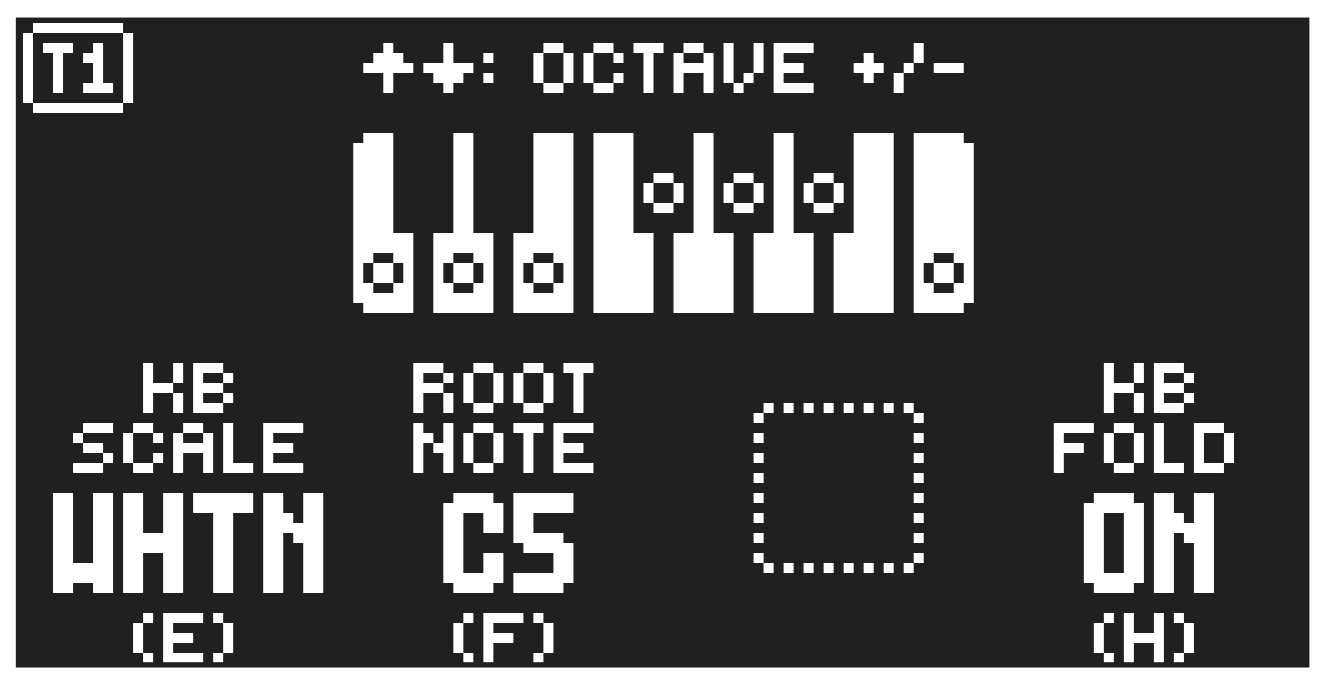
Press [FUNC] + [KEYBOARD] to open the KEYBOARD SETUP menu. Here you get a graphical view of which notes the [TRIG] keys play. Press [UP]/[DOWN] to transpose the keyboard up or down an octave.
In this menu, you can also set different musical scales, and select the root note of the scale. Use the DATA ENTRY knobs to change the settings. Press [NO] to exit the menu. Press [KEYBOARD] again to exit KEYBOARD mode. The settings are stored in the active pattern.
KB SCALE sets the track’s scale. This setting governs which notes are playable on the Digitakt II’s [TRIG] keys to allow only notes in the set scale. For a list of all selectable keyboard scales, please see “APPENDIX D: KEYBOARD SCALES” on page 115.
ROOT NOTE sets the root note for the chosen scale.
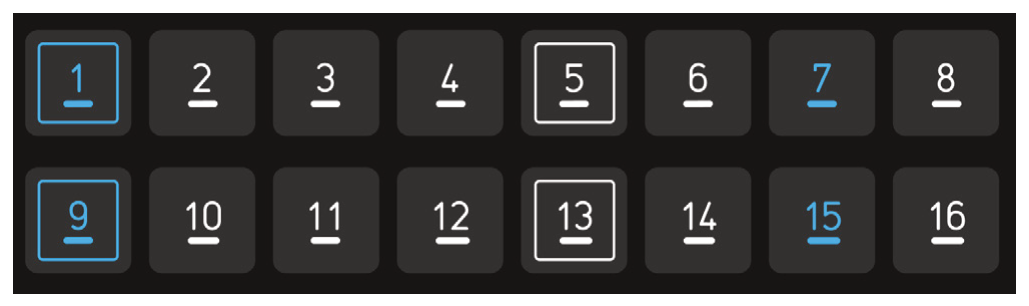
KB FOLD When set to ON, KB FOLD changes the way the notes are laid out on the [TRIG] keys and how they are played from external MIDI devices. Now all the [TRIG] keys trigger a note. The [TRIG 9] key plays the lowest note of the selected octave, root note and scale. The notes are then played upwards through the scale to [TRIG 16] and then further upwards on [TRIG 1–8]. When a scale contains less than eight notes in an octave, the “remaining” [TRIG] keys on the lower row will play the same notes as the first [TRIG] keys on the upper row. Blue [TRIG] keys signal that they contain notes that are one or more octaves distanced from each other.
In the following example of the whole tone scale [TRIG 15–16] keys play the same notes as the [TRIG 1–2] keys. [TRIG 1] and [TRIG 15] both plays a note that is one octave above [TRIG 9]. [TRIG 7] plays a note that is two octaves above [TRIG 9].
You can also use an external keyboard to play the active tracks preset chromatically. Connect the keyboard to the Digitakt II and configure the external keyboard and the Digitakt II MIDI Auto Channel (SETTINGS > MIDI CONFIG > CHANNELS) to the same MIDI channel.
Then play the keys on the external keyboard to play the active tracks preset chromatically.
You can play the active track’s preset chromatically even if the Digitakt II is not in KEYBOARD mode. Slices play from C1 and upwards, wrapping around after the last slice, when using the Grid and Slice machines and set SLICE to NOTE.
8.5.3 MUTE MODE
You can use MUTE mode to mute any of the 16 sequencer tracks. Unlike KEYBOARD mode, it makes no difference which track is active when you enter MUTE mode. All tracks are accessed simultaneously. Press any of the [TRIG] keys to mute the corresponding track. Press again to unmute. The color of the [TRIG] keys indicates its tracks mute status. Lit keys signify unmuted tracks. Unlit keys signify muted tracks.
There are two different versions of MUTE mode on the Digitakt II:
- GLOBAL MUTE MODE In GLOBAL MUTE mode, the muted tracks are muted in all patterns. In this mode, the [TRACK] keys are lit green. If a track with trigs placed on it is muted in GLOBAL MUTE mode, its [TRACK] key blinks green when the pattern plays.
Press [FUNC] + [TRK] to enter GLOBAL MUTE mode.
Press [FUNC] + [TRK] to exit GLOBAL MUTE mode.
- PATTERN MUTE MODE In PATTERN MUTE mode, the muted tracks are muted only in the active pattern. In this mode, the [TRACK] keys are lit magenta. If a track with trigs placed on it is muted in PATTERN MUTE mode, its [TRACK] key blinks magenta when the pattern plays.
Press [FUNC] + double-press [TRK] to enter PATTERN MUTE mode.
Press [FUNC] + [TRK] to exit PATTERN MUTE mode.
The GLOBAL MUTE mode settings are saved together with the project. The PATTERN MUTE mode settings are saved together with the pattern.
If a track with trigs placed on it is muted in PATTERN MUTE and GLOBAL MUTE mode, its [TRACK] key blinks magenta in both modes when the pattern plays.
You can also prepare tracks for muting/unmuting before the mute action takes effect. While in any MUTE mode, press and hold [FUNC] and then press the [TRIG] keys corresponding with the tracks you want to mute/unmute. The selected track will then be muted/unmuted when you release [FUNC]. At the top of the screen you can see an overview of the mute status for all the tracks. Square = unmuted track, horizontal line = muted track, a plus sign = a track prepared to be unmuted, an X = track prepared to be muted.
- You can also use QUICK MUTE to mute and unmute sequencer tracks. Press and hold [FUNC] and then press the [TRACK] keys to mute or unmute tracks.
- Digitakt II remembers the last used version of MUTE mode and will access this one first when you press [FUNC] + [TRK]. This also applies to QUICK MUTE.
8.5.4 TRIG MODE
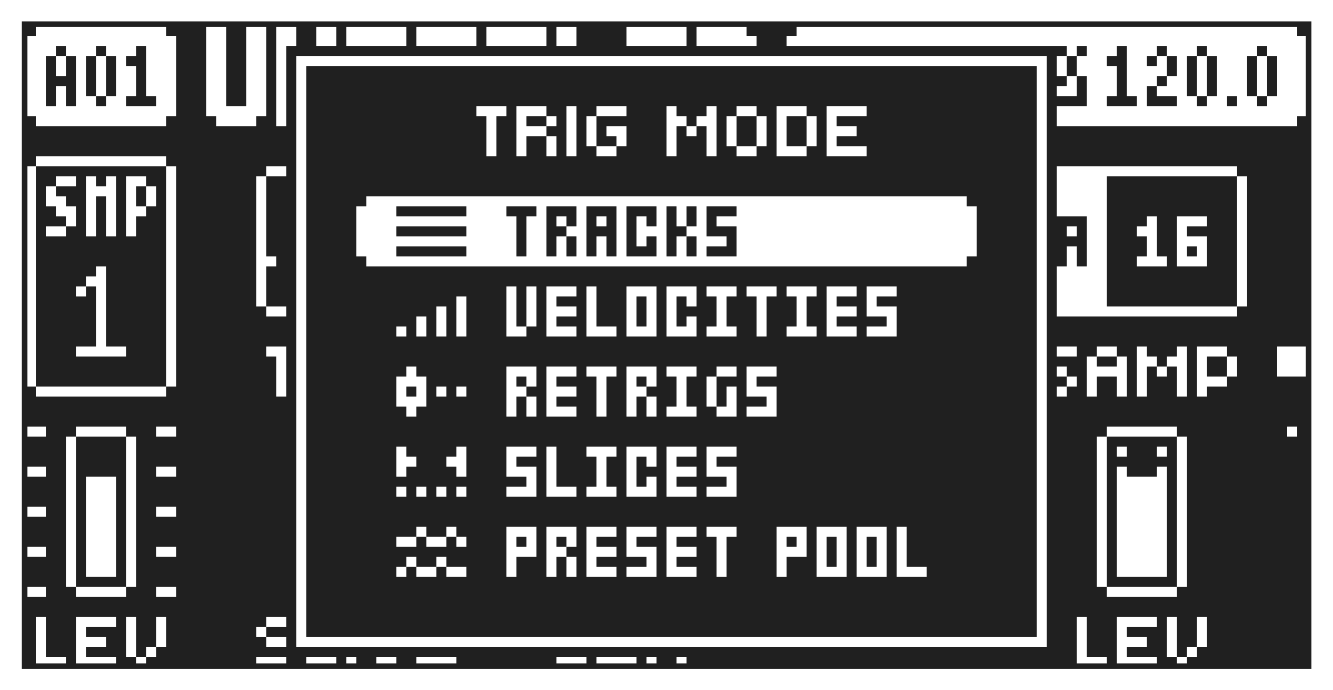
The various TRIG modes affect the functionality of the [TRIG 1–16] keys. Press [FUNC] + [UP]/[DOWN] to select which TRIG mode that should be active. The selected TRIG mode is active for all the tracks. All actions performed using the trig modes can be recorded in LIVE RECORDING mode.
TRACKS
This is the default TRIG mode. In this mode, the [TRIG 1–16] keys triggers the corresponding audio/ MIDI tracks.
VELOCITIES
In this TRIG mode, the [TRIG 1–16] keys triggers the active track with different amounts of velocity. Trig 1 = Velocity 8
Trig 2 = Velocity 16
Trig 3 = Velocity 24
Trig 4 = Velocity 32
Trig 5 = Velocity 40
Trig 6 = Velocity 48
Trig 7 = Velocity 56
Trig 8 = Velocity 64
Trig 9 = Velocity 72
Trig 10 = Velocity 80
Trig 11 = Velocity 88
Trig 12 = Velocity 96
Trig 13 = Velocity 104
Trig 14 = Velocity 112
Trig 15 = Velocity 120
Trig 16 = Velocity 127
RETRIGS
In this TRIG mode, the [TRIG 1–16] keys triggers the active track with different amounts retrig rates. Trig 1 = Retrig rate 1/1
Trig 2 = Retrig rate 1/2
Trig 3 = Retrig rate 1/3
Trig 4 = Retrig rate 1/4
Trig 5 = Retrig rate 1/5
Trig 6 = Retrig rate 1/6
Trig 7 = Retrig rate 1/8
Trig 8 = Retrig rate 1/12
Trig 9 = Retrig rate 1/16
Trig 10 = Retrig rate 1/20
Trig 11 = Retrig rate 1/24
Trig 12 = Retrig rate 1/32
Trig 13 = Retrig rate 1/40
Trig 14 = Retrig rate 1/48
Trig 15 = Retrig rate 1/64
Trig 16 = Retrig rate 1/80
SLICES
This TRIG mode is specifically designed for use with the Grid and Slice SRC machines. In this mode, the [TRIG 1–16] keys trigger the slices defined by these machines. [TRIG 1] plays the first slice, [TRIG 2] the second, and so on. Lit blue [TRIG] keys indicate that a slice is associated with the key. If there are more than 16 slices, press [PAGE] to switch to the next group of 16 slices. If the active track contains any other SRC machine than Grid or Slice, the [TRIG 1] key will play the whole sample.
PRESET POOL
In this TRIG mode, the [TRIG 1–16] keys triggers sixteen preset slots in the preset pool. The first page triggers the presets in slots 1–16. Press [PAGE] + [RIGHT] to go to page 2 to triggers the presets in slots 17–32 and so on. Press [PAGE] + [LEFT/RIGHT] to select which slots you wish to trigger. For more information, please see “9.1 THE +DRIVE LIBRARY AND THE POOL” on page 29.
The RETRIGS, SLICES and PRESET POOL trig modes only works on audio tracks.