11.2 TRIG PAGE 1
11. TRACK PARAMETERS > 11.2 TRIG PAGE 1 · PDF p. 53–54 · OS 1.17
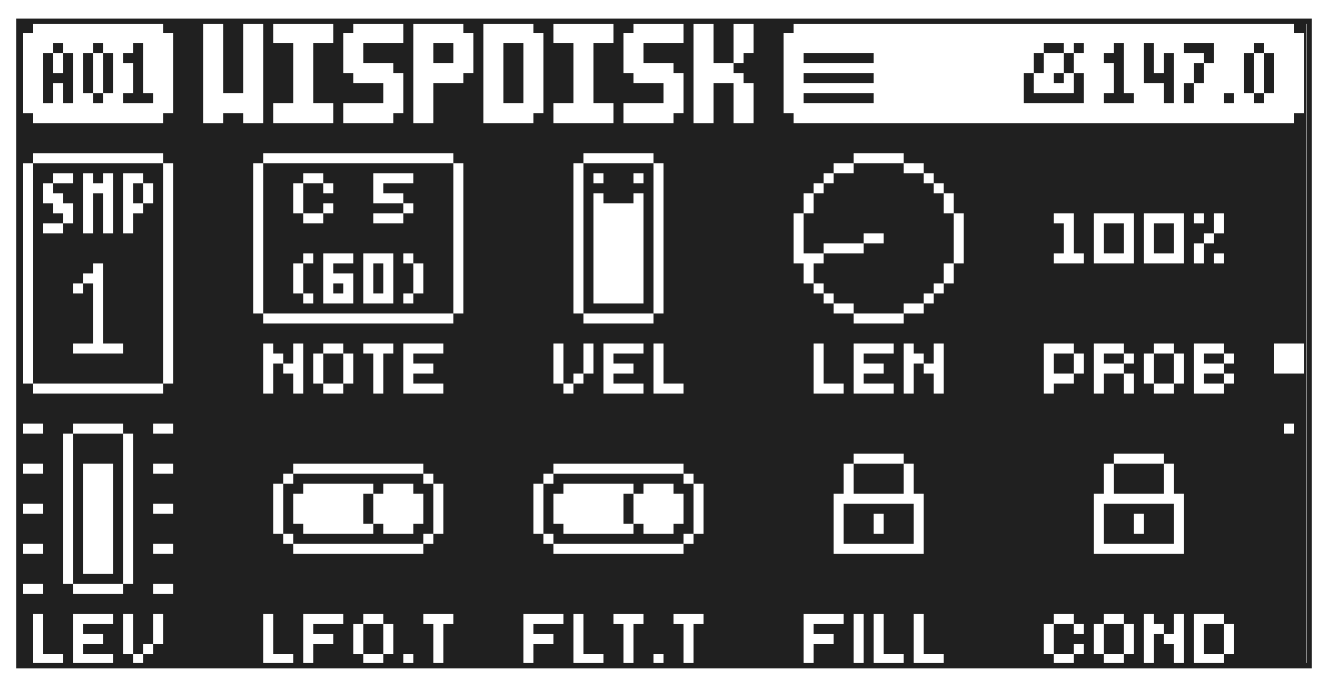
Here you set the options for notes that are trigged. Here you also select trig conditions. Press [TRIG PARAMETERS] to access the menu. Change settings using the DATA ENTRY knobs. These general settings affect note trigs placed on the sequencer. Trigs can be locked to other settings on any step of the pattern by first pressing and holding a [TRIG] key, then changing the settings.
Press [TRIG PARAMETERS] to access this parameter page.
NOTE
Trig Note sets the pitch of the note when trigged. When in LIVE RECORDING mode and playing in KEYBOARD mode, the pitch of the [TRIG] keys played will override this setting. Press and turn DATA ENTRY knob A to select only note values that exist in the scale set by KB SCALE. This behavior can be changed using the NOTE PARAM setting in the PERSONALIZE menu. For more information, please see “14.7.6 NOTE PARAM” on page 82 and “8.5.2 KEYBOARD SETUP MENU” on page 26.
VEL
Trig Velocity sets the velocity of the sequencer’s note trigs.
LEN
Trig Length sets the length of the note trig. In LIVE RECORDING mode, the duration of pressing the [TRIG] keys overrides this general setting.
PROB
Trig Probability sets the probability that the trigs on the track plays or not. The probability outcome is re-evaluated every time a trig is set to play. The default setting is 100%, i.e. all the trigs on the track plays every time. This parameter can be parameter locked which enables separate trigs their own probability.
LFO.T
LFO Trig controls if the LFO will be trigged or not.
FLT.T
Filter Trig controls if the filter envelope will be trigged or not.
FILL
Fill is a separate trig condition that determines if a trig is active (plays) or not depending on if the device is in FILL mode or not. For more information, please see “10.8.4 FILL MODE” on page 49, and “10.7.3 TRIG CONDITIONS AND CONDITIONAL LOCKS” on page 48.
ON A trig with FILL set to ON, plays when FILL mode is active.
OFF A trig with FILL set to OFF plays when FILL mode is not active.
The sequencer needs to be in FILL mode to activate the FILL trig condition. For more information, please see “10.8.4 FILL MODE” on page 49.
COND
(Trig Condition) when you add a conditional lock. COND sets the Trig Condition with which a set of conditional rules can be applied to any trig, using a conditional parameter lock. For more information, please see “10.7.3 TRIG CONDITIONS AND CONDITIONAL LOCKS” on page 48.