11.8 FX PAGE
11. TRACK PARAMETERS > 11.8 FX PAGE · PDF p. 57–58 · OS 1.17
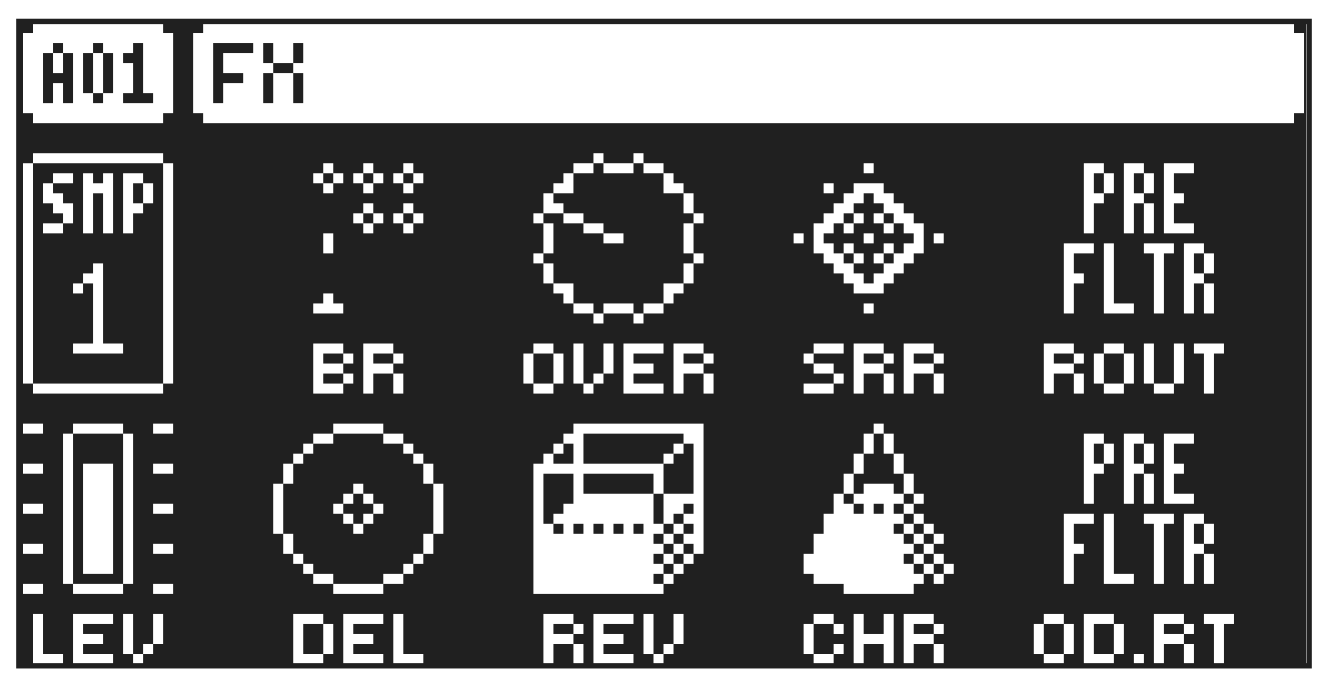
The FX parameter page contains a number of FX related parameters such as the Bit Reduction, Overdrive, and Sample Rate Reduction. Here you also find the send levels for the Delay, Reverb, and Chorus effects. Press [FX] to access this parameter page.
BR
Bit Reduction sets the bit rate. The parameter range is from 16 bits to 1 bit.
OVER
(Overdrive) sets the gain amount into the digital overdrive.
SRR
Sample Rate Reduction sets the amount of sample rate reduction.
ROUT
SRR Routing sets if the Sample Rate Reduction effect is applied pre (before) or post (after) the filter section.
DEL
Delay Send sets the amount of sound sent through to the Delay effect. For more information, please see “12. FX AND MIXER PARAMETERS” on page 61.
REV
Reverb Send sets the amount of sound sent through to the Reverb effect. For more information, please see “12. FX AND MIXER PARAMETERS” on page 61.
CHR
Chorus Send sets the amount of sound sent through to the Chorus effect. For more information, please see “12. FX AND MIXER PARAMETERS” on page 61.
OD.RT
Overdrive Routing selects if the overdrive effect is routed before (PRE) or after (POST) the filter machine. Please note that there are no parameters on the FX page for MIDI tracks.