10.6 SEQUENCER MENU (EUCLIDEAN MODE)
10. THE SEQUENCER > 10.6 SEQUENCER MENU (EUCLIDEAN MODE) · PDF p. 46–47 · OS 1.12
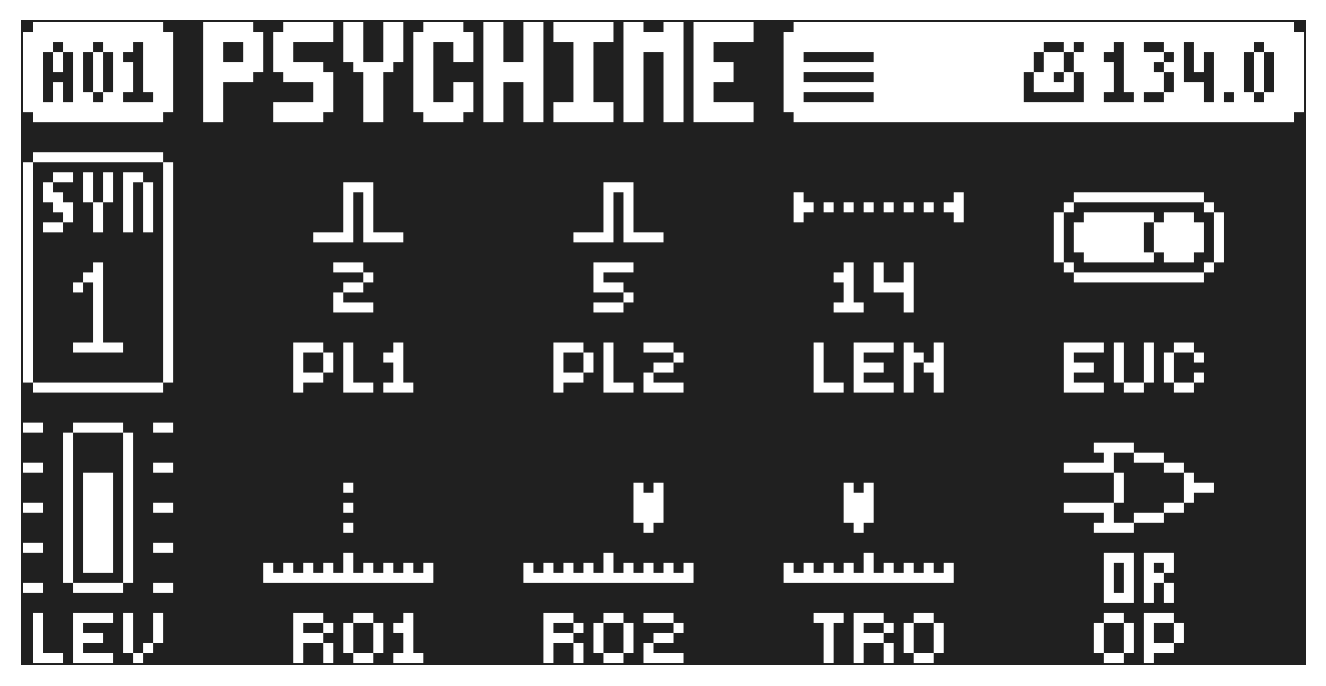
The Euclidean sequencer mode uses two separate pulse generators to generate events (trigs) that are placed as evenly spread out over the sequencer track’s trigs as possible. You can also set a Boolean logic operator to combine or subtract the trigs from the two pulse generators in different ways.
When you turn on Euclidean mode for a track, the [REC] button will turn blue indicating the mode is active, and the [TRIG] keys where the generated trigs are placed will also be blue. Any trigs placed on the sequencer before activating the Euclidean mode will be hidden and inactive while in this mode, but they’ll reappear when you turn the mode off again. If you want to convert an Euclidean sequence into regular sequencer trigs, just press and hold [FUNC] while turning the Euclidean mode off. This will remove any trigs that were placed prior to entering Euclidean mode.. While in Euclidean mode, it is not possible to add note trigs manually to the sequencer. However, you can still do parameter locking on the already generated trigs. Press [FUNC] + [AMP] open the SEQUENCER menu.
PL1 Pulse generator 1 sets the number of pulses (trigs) placed on the sequencer by this generator.
PL2 Pulse generator 2 sets the number of pulses (trigs) placed on the sequencer by this generator.
LEN Track length sets how many steps the track will have. This parameter is only available in PER TRACK mode. For more information, please see “10.11 PAGE SETUP MENU” on page 48.
EUC Euclidean mode switches the Euclidean sequencer mode on/off.
R01 Rotation generator 1 rotates the trigs placed by generator 1 forward or backwards on the track.
R02 Rotation generator 2 rotates the trigs placed by generator 2 forward or backwards on the track.
TRO Track rotation rotates the trigs placed by both generator 1 and generator 2 forward or backwards on the track.
OP Boolean operator lets you add or subtract the trigs generated from the two pulse generators in different ways based on mathematical logical expressions.
OR All trigs from both generator 1 or 2 are placed on the track.
XOR Trigs from both generator 1 or 2 are placed on the track unless they are added to the same sequencer step.
AND Only trigs added to the same sequencer step by generator 1 and 2 are placed on the track.
SUB Trigs from generator 1 are placed on the track unless generator 2 adds a trig on the same step as generator 1.
In Euclidean mode, please note that if you press any already generated trigs, they will remain in regular sequencer mode when you switch Euclidean mode off.