10.9 PAGE SETUP MENU
10. THE SEQUENCER > 10.9 PAGE SETUP MENU · PDF p. 43–44 · OS 1.4.1
ERRATUMFour subsection headings carry the wrong number
“PER TRACK MODE” inside §10.9 PAGE SETUP MENU is printed as “9.9.2” (it is 10.9.2), and “R.STRT” inside §16.1 THE SAMPLING MENU is printed as “13.1.6” although it sits between 16.1.5 and 16.1.7 (it is 16.1.6); the table of contents repeats both typos. The OS 1.4.0 manual added “PRE/POST FADER” inside §17.3 AUDIO ROUTING printed as “14.3.5” (it is 17.3.5), and the OS 1.4.1 manual, which inserts §6.9 THE OUTBOX 8 and renumbers §6.10–6.13, leaves “TRANSFERRING BACKED UP DATA TO TONVERK” inside §6.11 BACKING UP TONVERK printed as “6.10.2” (it is 6.11.2; the table of contents repeats it). The 1.4.0 manual's “6.13.3 WAVETABLES” typo is no longer one: in 1.4.1 the Sample browser is §6.13. Section numbering elsewhere is unaffected.
Adjudicated in CLAUDE.md + §10.9
Documented error in the printed manual. This project records contradictions instead of hiding them — the note stays in English, as all source-quoting content does.
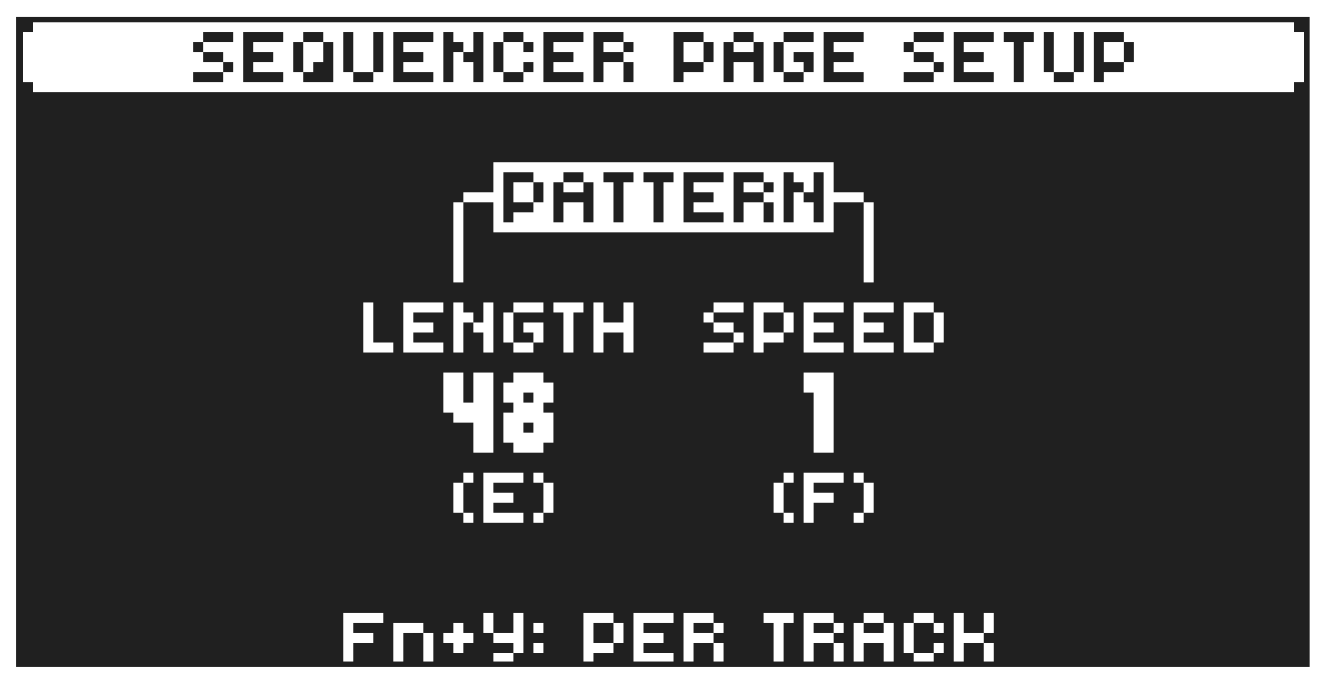
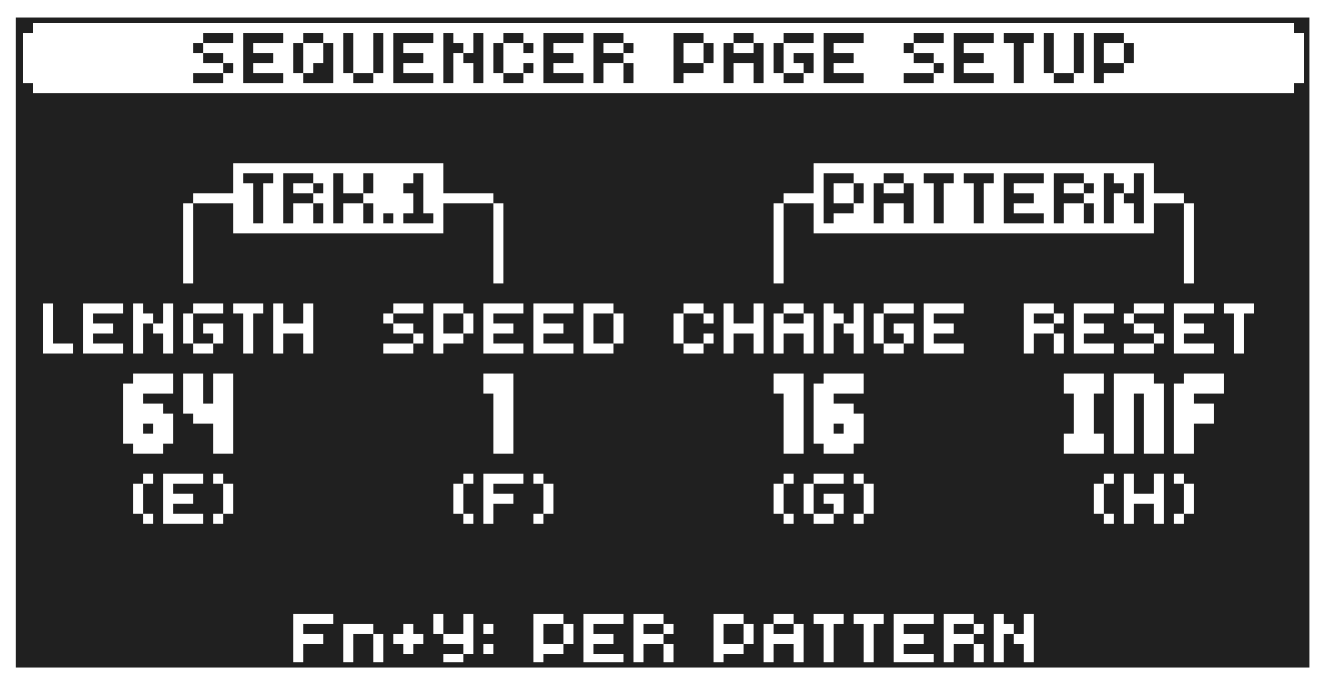
You can set the length and timing of the pattern and the tracks in this menu. The sequencer has up to 256 steps, spread across 16 sequencer pages with 16 steps per page. The SCALE menu has two modes. In PER PATTERN mode all tracks share the same length. In PER TRACK mode, each track can have different lengths. Press [FUNC] + [PAGE] to access the SCALE menu. Press [FUNC] + [YES] to toggle between the two SCALE modes. Use the DATA ENTRY knobs to adjust the settings.
10.9.1 PER PATTERN MODE
In this mode, all tracks of the pattern share the same length and time signature.
LENGTH sets the number of steps on the current pattern page. The leftmost number displays the number of steps on the active pattern page. If you use 17 steps or more in a pattern and GRID RECORDING mode is active, the [PAGE] key is used to toggle between the different pattern pages. Press [FUNC] and then turn data entry knob E to change length in even steps of 16.
SPEED controls the speed of track playback in multiples of the current tempo. For a setting of 1/8 plays back the track at one-eighth of the set tempo. 3/4 plays the track back at three-quarters of the tempo; 3/2 plays back the track twice as fast as the 3/4 setting. 2 makes the track play at twice the speed of the BPM.
When you extend the length of a pattern, its trigs copies automatically over to the new steps. If a pattern consists of for example two pages and the pattern length is increased to four pages, the two additional pattern pages are then copies of the first two pattern pages.
Press the [PAGE] key to change the total length of the pattern quickly. Press the [TRIG] keys to change the number of steps of the pattern quickly.
9.9.2 PER TRACK MODE
In this mode, you can assign individual length and scale to the tracks of the pattern. Press [FUNC] + [YES] to switch between the two scale modes.
The TRACK column sets the step length (number of sequencer steps) and scale (speed) of the track playback. The settings only affect the active track.
The PATTERN column sets the master change length and the master reset length of the pattern, both measured in sequencer steps.
LENGTH sets the number of steps on the current pattern page. The leftmost number displays the number of steps on the active pattern page. If you use 17 steps or more in a pattern and GRID RECORDING mode is active, the [PAGE] key is used to toggle between the different pattern pages. Press [FUNC] and then turn data entry knob E to change length in even steps of 16.
SPEED controls the speed of track playback in multiples of the current tempo. For a setting of 1/8 plays back the track at one-eighth of the set tempo. 3/4 plays the track back at three-quarters of the tempo; 3/2 plays back the track twice as fast as the 3/4 setting. 2 makes the track play at twice the speed of the BPM.
- The SPEED setting also affects the speed of all LFOs, the delays time settings, the arpeggiator and retrig speed.
- A SPEED setting of 2 helps increase the base resolution of the step sequencer to 32nd notes. A SPEED setting of 3/4 is practical when Tonverk is playing alongside other instruments set to the same BPM, and you want Tonverk to play triplets.
CHANGE (Pattern Change) controls for how long the active pattern plays before it changes to a cued or chained pattern.
RESET (Pattern Reset) controls the number of steps the pattern plays before all tracks reset and restart from the first step on the first page. An INF setting makes the tracks of the pattern loop infinitely, without ever being restarted. Note that this setting also affects how long the active pattern plays before a chained pattern starts playing. The CHANGE parameter overrides this if its parameter value is less than the RESET value.