17.3 AUDIO ROUTING
17. SETTINGS MENU > 17.3 AUDIO ROUTING · PDF p. 77–78 · OS 1.4.1
ERRATUMFour subsection headings carry the wrong number
“PER TRACK MODE” inside §10.9 PAGE SETUP MENU is printed as “9.9.2” (it is 10.9.2), and “R.STRT” inside §16.1 THE SAMPLING MENU is printed as “13.1.6” although it sits between 16.1.5 and 16.1.7 (it is 16.1.6); the table of contents repeats both typos. The OS 1.4.0 manual added “PRE/POST FADER” inside §17.3 AUDIO ROUTING printed as “14.3.5” (it is 17.3.5), and the OS 1.4.1 manual, which inserts §6.9 THE OUTBOX 8 and renumbers §6.10–6.13, leaves “TRANSFERRING BACKED UP DATA TO TONVERK” inside §6.11 BACKING UP TONVERK printed as “6.10.2” (it is 6.11.2; the table of contents repeats it). The 1.4.0 manual's “6.13.3 WAVETABLES” typo is no longer one: in 1.4.1 the Sample browser is §6.13. Section numbering elsewhere is unaffected.
Adjudicated in CLAUDE.md + §10.9
Documented error in the printed manual. This project records contradictions instead of hiding them — the note stays in English, as all source-quoting content does.
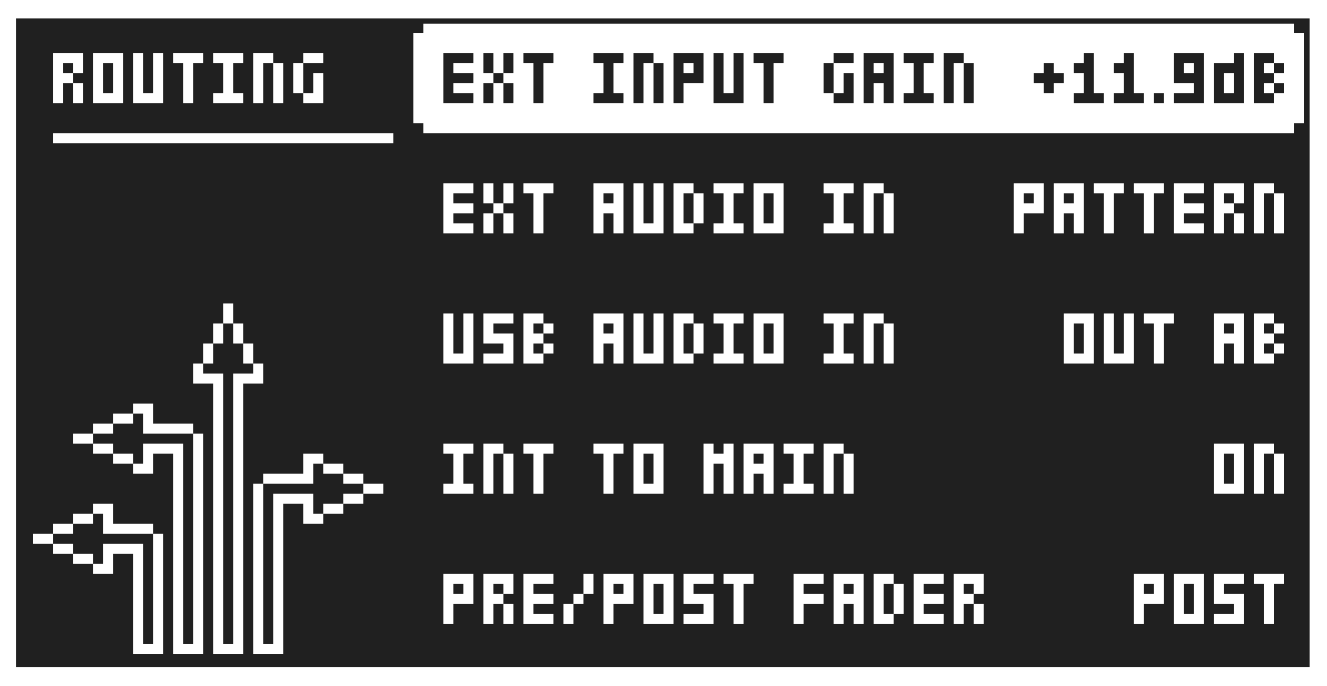
In this menu, you’ll find additional audio routing options for the external audio from the IN A/B inputs and for audio over USB. The settings made here affects all the patterns in the project.
17.3.1 EXT INPUT GAIN
Sets the gain of the incoming audio from the IN A/B inputs.
17.3.2 EXT AUDIO IN
This parameter lets you select where to route the audio from the IN A/B inputs.
- OFF The audio from the IN A/B inputs is turned off
- PATTERN The audio routing set by the ROUT parameter on the Mix track’s SRC page in the pattern decides the audio routing.
- OUT AB The audio is routed to the A/B outputs.
- OUT CD The audio is routed to the C/D outputs.
- OUT EF The audio is routed to the E/F outputs.
17.3.3 USB AUDIO IN
This parameter lets you select where to route the external audio over USB.
- OFF The audio in over USB is turned off
- PATTERN The audio routing set by the ROUT parameter on the Mix track’s SRC page in the pattern decides the audio routing.
- OUT AB The audio is routed to the A/B outputs.
- OUT CD The audio is routed to the C/D outputs.
- OUT EF The audio is routed to the E/F outputs.
The settings you make using the EXT AUDIO IN and USB AUDIO IN parameters apply at the project level and override any settings made with the ROUT parameter on the Mix track’s SRC page For more information, please see “4.4.1 ROUTING TRACKS” on page
- and “15.3 SRC PAGE” on page 70.
17.3.4 INT TO MAIN
Sets if the Tonverk sends internal audio from the Mixer (and the Main FX) to the A/B, CD, and E/F outputs or not when used with Overbridge or as a class compliant audio device. Sets whether Tonverk sends internal audio from the Mixer to the A/B, C/D, and E/F outputs when used with Overbridge or as a class compliant audio device. Note that any audio routed directly from a track to these outputs will still be heard regardless of this setting.
OFF No sound is sent from the Mixer to the outputs.
ON Audio is always sent to the outputs.
14.3.5 PRE/POST FADER
Sets if audio over USB should be pre or post the track level setting.