10.11 SONG MODE
10. THE SEQUENCER > 10.11 SONG MODE · PDF p. 47–49 · OS 1.4.1
A song is an arrangement of patterns set up to play in sequence. Each row in the SONG mode arrangement can have separate settings for pattern, row repeat, row length, and tempo. A song can be up to 99 rows in length, and each project can contain up to 16 songs.
10.11.1 THE SONG EDIT SCREEN
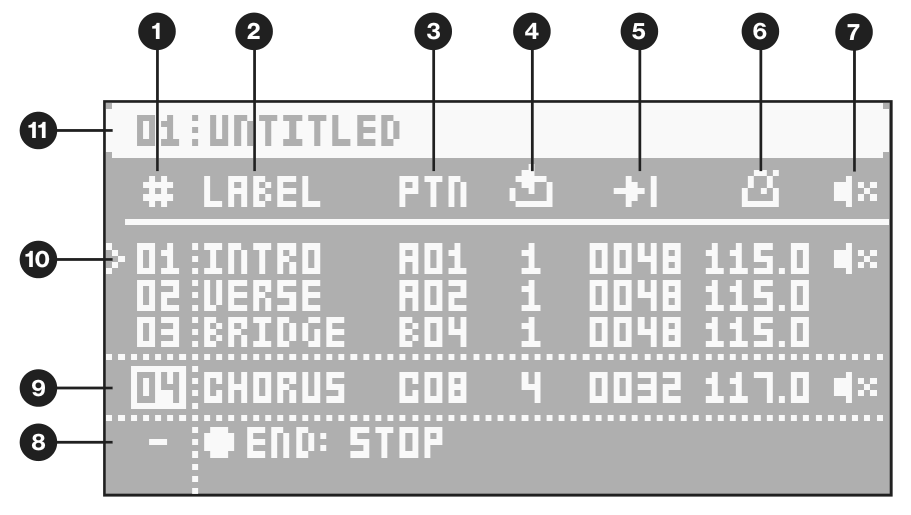
Press [SONG] and then press [TRIG 1–16] to select a song and enter SONG mode. Press [SONG] again and then press [RIGHT] to open the SONG EDIT screen. Use the [ARROW] keys to navigate the song rows and columns, highlighting the parameter you wish to edit, and then use LEVEL/DATA or any DATA ENTRY knob to edit the selected function.
- SONG ROW (Range 01–99)
- LABEL lets you select a keyword for the row. The keyword is related to song structure, such as Verse, Chorus, and Bridge. It can also be the name of the pattern.
- PTN allows you to select the pattern to be played on a row. Press [FUNC] while turning the knob to quickly change banks.
- ROW PLAY COUNT The number of times the row plays before the song advances to the next row.
- ROW LENGTH (measured in sequencer steps). This setting determines the number of steps the sequencer plays from the selected pattern. The default value is the same as the patterns CHANGE setting in the PAGE SETUP menu. (Range: 2–1024, the last 25 values are written as K00–K24)
- ROW TEMPO Here, you set the row’s BPM per row. By default, the row inherits the the song’s BPM set in the TEMPO menu. Selecting a tempo on any row overrides the previously set song tempo.
- ROW MUTE lets you mute the tracks of the pattern on the selected row. Highlight and press [YES] to edit. A mute icon is displayed in the rows that have tracks that are muted. Use the [TRIG]/[SUBTRACKS] keys to mute and unmute the tracks. When selecting a pattern for the row, the row’s mute state initially reflects the pattern’s mute state.
- END row. This row is always added at the end of a song and determines what happens when the last song row has played. By default it’s set to LOOP, which restarts the song from the beginning, but it can also be set to STOP the song.
- The currently selected row is highlighted between dotted lines. Use [UP] and [DOWN] to select row.
- PLAYHEAD position shows the row currently playing (or set to play if the sequencer is stopped).