12.9 EXTERNAL MIXER
12. FX AND MIXER PARAMETERS > 12.9 EXTERNAL MIXER · PDF p. 70–72 · OS 1.12
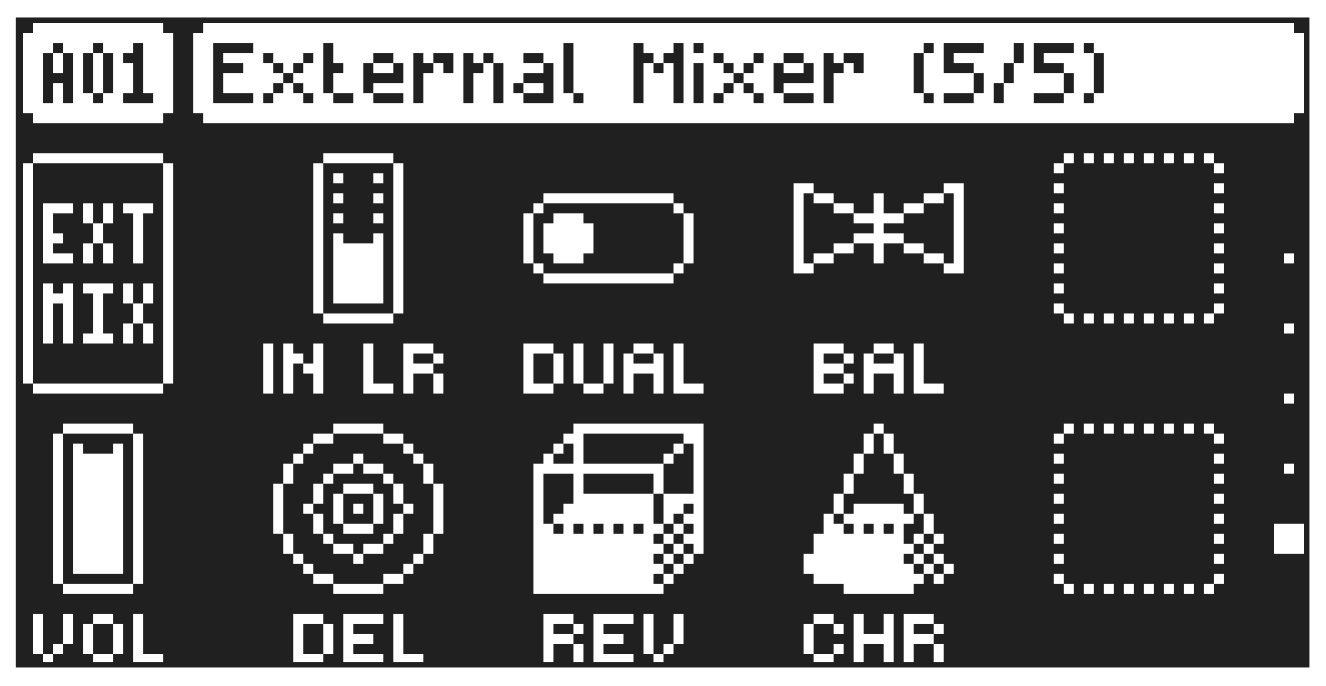
(MIXER PAGE 5)
The EXTERNAL MIXER page contains a number of parameters related to when you use the IN L/R inputs to process incoming audio.
IN LR
In Level sets the level of the audio from the IN L/R audio input.
DUAL
Dual Mono sets if the inputs are processed as a single stereo input or as two separate mono inputs.
Setting this parameter to ON changes the rest of the parameters from controlling both inputs to separate controls for channel L and R split over two mixer pages The BAL parameters changes to a PAN parameter.
BAL
Balance sets the balance of the audio from the INPUT L and INPUT R inputs in the stereo field.
VOL
Pattern Volume sets the patterns overall audio level. At a parameter setting of 100, you have unity gain. Below that, the signal is attenuated. Above that, the signal is amplified. This parameter can be used to balance the volume between different patterns and is saved together with the kit. Use LEVEL/DATA to adjust the settings..
DEL
Delay send sets the amount of sound from the IN L/R audio input that is sent through to the delay effect. For more information, please see “12.2 DELAY” on page 65.
REV
Rev send sets the amount of sound from the IN L/R audio input that is sent through to the reverb effect. For more information, please see “12.3 REVERB” on page 66.
CHO
Chorus send sets the amount of sound from the IN L/R audio input that is sent through to the chorus effect. For more information, please see “12.4 CHORUS” on page 67.
If you set DUAL to ON, the first EXTERNAL MIXER page will control the audio from INPUT L. You also get an additional EXTERNAL MIXER page (6) that control the audio from INPUT R.
After you load/reload a project, or after pressing [STOP] + [STOP], you must trig or play an audio track to activate the effects for the External in mixer.