9.11 CHAINS
9. THE SEQUENCER > 9.11 CHAINS · PDF p. 46–47 · OS 1.42
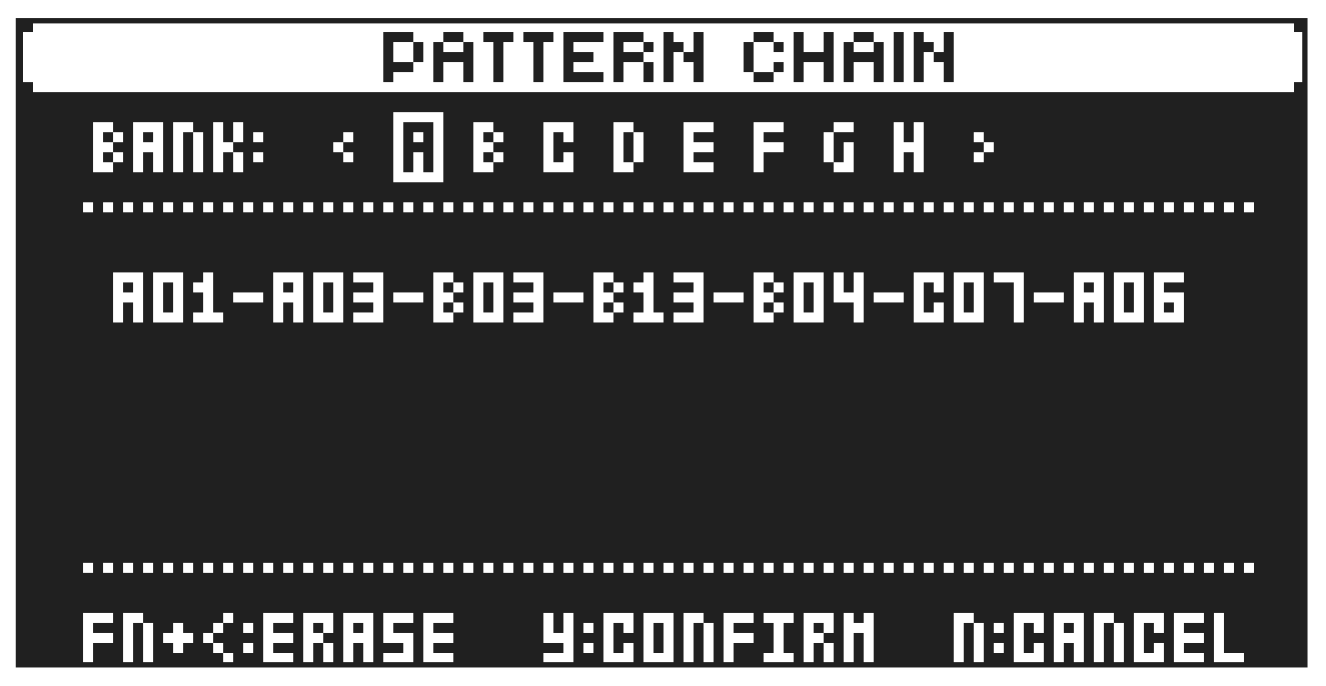
Chains are sequences that consist of more than one pattern. You can use chains to preselect and automate in what order you want your patterns to play.
You can create one chain and it can contain any pattern in bank A–H. The chain can be to 64 patterns long.
- Press [PTN], and then press [FUNC] + [YES] to open the chain creator screen.
- Use the [LEFT]/[RIGHT] keys to select a bank (if you want to select a pattern from another bank than the current). Then press [TRIG 1–16] to select a pattern. Repeat until you have created the desired chain.
- (Optional) Press [FUNC] + [LEFT] to delete the last pattern from the chain.
- Press [YES] to confirm the pattern chain and close the chain creator screen. Press [NO] if you wish to cancel the pattern chain and close the chain creator screen.
- Press [PLAY] to start the sequencer and play the chain. The chain will be looped once the final pattern of the chain has played.
To exit chain mode, select a pattern or song using the normal selection process.
There is also a legacy procedure for how you create chains that also can be used.
- Press and hold [PTN] and then press a [TRIG 1–16] key to select the first pattern in the chain.
- Release the [PTN] key and then press [TRIG 1–16] keys in the same order as you want the chained patterns to play. Keep a previous [TRIG] key pressed while you press the next one, the one after that and so on. You can press the same [TRIG] key again if you wish to add the pattern multiple times in a row. If you want to add a pattern from another bank, use the [LEFT]/[RIGHT] keys to select a bank and then press [TRIG 1–16] to select pattern.
- Press [PLAY] to start the sequencer and play the chain. The chain will be looped once the final pattern of the chain has played.
Please note that the chain will be lost when you create a new chain or when you select a new bank/pattern. Chains cannot be saved and will be lost when you switch the Syntakt off.
- Chains can be created while the sequencer is running.
- You can also use MIDI program change messages from an external device to change patterns on the Syntakt. For more information, please see “14.4.1 SYNC” on page 75.