10.7 VOICE SETUP MENU
10. THE SEQUENCER > 10.7 VOICE SETUP MENU · PDF 第 47–48 · OS 1.12
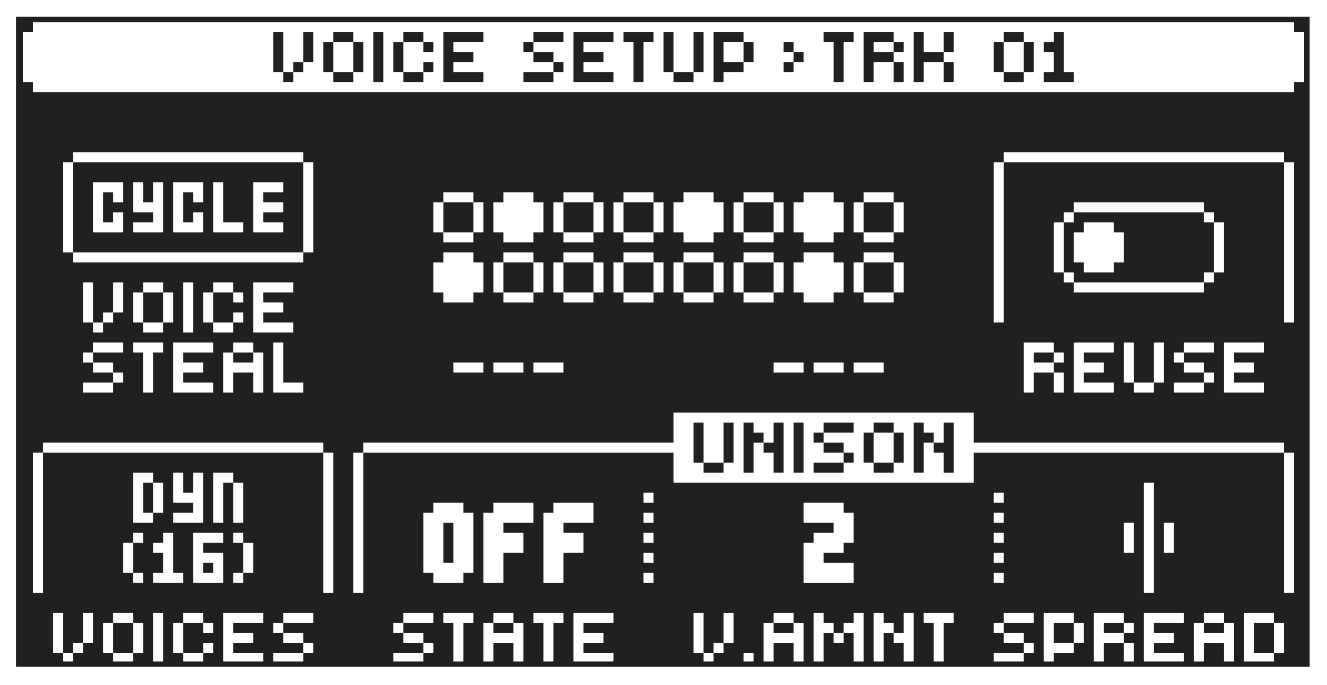
Press [VOICE SETUP] to open the VOICE SETUP menu, where you handle the allocation of the Digitone II’s 16 voices. In this menu, you can also make the settings for unison and voice stealing. Press [TRK] + [TRIG 1–16] to select which track to edit. At the top of the screen, you can see what track is selected. The center of the screen shows the currently playing voices. Use the DATA ENTRY knobs to change the settings. Press [NO] to exit the menu. The voice settings are stored in the active pattern.
VOICE STEAL The Digitone II has 16 voice polyphony. VOICE STEAL sets the rules for how voices are stolen (which voice is taken when you play a new note) when you use more than 16 voices at the same time. The VOICE STEAL parameter affects the whole pattern.
CYCLE The first played note is stolen first.
TRACK Track priority. Notes played on track 1 has priority over notes played on track 2–16. Track 2 notes over track 3–16. Track 3 notes over track 4–16 etc.
LO Lowest note is stolen first
HI Highest note is stolen first.
REUSE Sets if the same note played twice should reuse the same voice, or cycle to use another free voice.
ON Reuses the same voice. Useful for staccato effects and drums.
OFF Cycles to use another voice. Good for piano-like sounds and pads.
VOICES Sets the number of voices (1–16) you want to lock to a specific track. A locked voice cannot be used or stolen by another track. If you lock voices to a track, the track cannot use more voices than the ones that are locked to it. The first number shows the number of locked voices to the track. The number in brackets shows how many unlocked voices that remain. If you set the parameter to DYN (dynamic) it will use any available voices to play its preset.
The number of voices that are used to play a preset is also affected by the PLAY MODE setting in the SETUP menu. For more information, please see “9.6 THE SETUP MENU” on page 35.
STATE Unison State turn unison on/off. Unison gives the possibility to add several voices to play the same note.
V.AMNT Unison Voice Amount sets the number of voices that plays for each note.
[FUNC] + [VOICE SETUP] toggles unison on/off.
SPREAD Unison Spread adds pan and detune to the unison voices.
You can copy the settings in the VOICE menu and paste it to another pattern. In the VOICE menu, press [FUNC] + [RECORD] to copy the parameter settings. Change pattern and open VOICE menu, and then press [FUNC] + [STOP] to paste the settings.