12.5 COMPRESSOR
12. FX AND MIXER PARAMETERS > 12.5 COMPRESSOR · PDF 第 67–69 · OS 1.12
(MIXER PAGE 1)
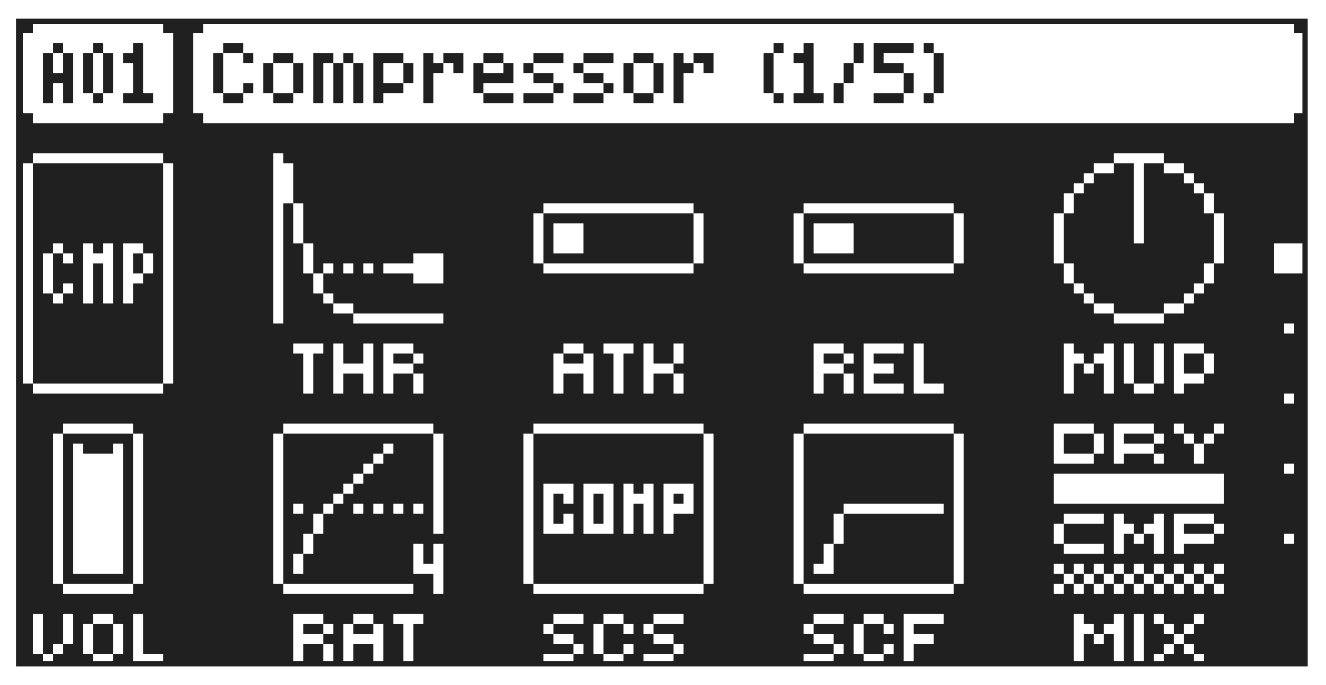
The Compressor master effect compresses the dynamic range of the signal by reducing the volume of loud sounds relative to the quiet sounds. There are eight parameters with which the compressor is customized on this page. There is a bar on the left side of the screen that visually represents the amount gain reduction THR
Threshold sets the threshold of the compressor. A lower threshold means a larger portion of the signal is subject to compression.
ATK
Attack sets the time of the compressor attack phase, i.e. how quickly the compressor responds to loud peaks.
REL
Release sets the time of the compressor release phase, i.e. how long it takes for the compression to recover in quieter moments.
MUP
Makeup Gain sets the makeup gain of the compressor output, to compensate for the reduced signal levels caused by compression. The Makeup Gain parameter value is displayed in dB.
VOL
Pattern Volume sets the kits overall audio level. This parameter basically has the same function as the MAIN VOLUME knob, but is saved together with the kit. Use LEVEL/DATA to adjust the settings.
RAT
Compression Ratio. There are eight different compression ratios, 1.50, 2.00, 3.00, 4.00, 6.00, 8.00, 16.00 and 20.00. Higher ratios result in greater compression of the signal.
SCS
Sidechain Source decides what audio source the compressor analyzes when it performs sidechaining.
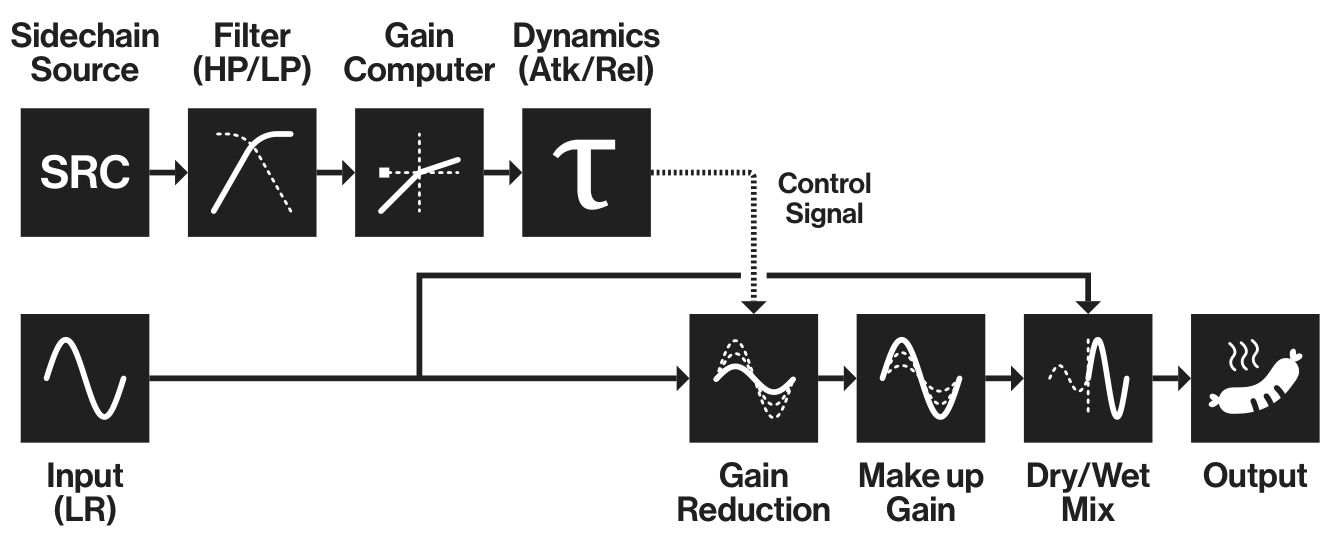
Sidechaining is the process when the compressor uses the output of an audio source to control the overall action of the compressor. For example, if you set SCS to TRK1 where you have a kick drum, every time the kick drum plays, the compressor lowers the overall sound of the mix.
COMP MIX sets the sidechain source to be all the tracks that are routed to the compressor.
COMP (Not Comp) sets the sidechain source to be all the tracks that are not routed to the compressor.
TRK1–16 sets the sidechain source to be the sound sent from one of the separate audio tracks.
IN LR sets the sidechain source to be the sound coming from IN L/R.
IN L sets the sidechain source to be the sound coming from INPUT L.
IN R sets the sidechain source to be the sound coming from INPUT R.
- The results of the COMP MIX and NOT COMP settings depends on the selections you make on the COMPRESSOR ROUTING page. For more information please see “9.6.1 KIT” on page 35.
- The IN L and IN R options are only available if you set DUAL on the External mixer page to ON. The IN LR option is only available if you set DUAL to OFF. For more information, please see “12.9 EXTERNAL MIXER” on page 70.
SCF
Sidechain Filter filters the signal from the sidechain source before the compressor analyzes it. The parameter ranges from a low-pass filter to a high-pass filter. Negative parameter values set a low-pass filter. Positive parameter values set a high-pass filter.
When set as a low-pass filter, the compressor reacts mostly to bass frequencies. Use this setting for a characteristic pumping compressor sound. When set as a high-pass filter, the compressor reacts less to bass frequencies. Use this setting to avoid pumping.
DRY/WET MIX
Dry/Wet Mix sets the mix of the uncompressed signal and the compressor output signal. A setting of 0 results in a completely uncompressed signal. A setting of 127 lets only the compressed signal pass through. All values in between mix the uncompressed signal with the compressed signal, which is known as parallel compression.
The Digitone II compressor
Filter (HP/LP)
Gain Reduction Input (LR)
Output Control Signal Dry/Wet Mix Make up
Gain Sidechain Source Gain Computer Dynamics (Atk/Rel) SRC