9.6 RETRIG MENU
9. THE SEQUENCER > 9.6 RETRIG MENU · PDF 第 40–41 · OS 1.42
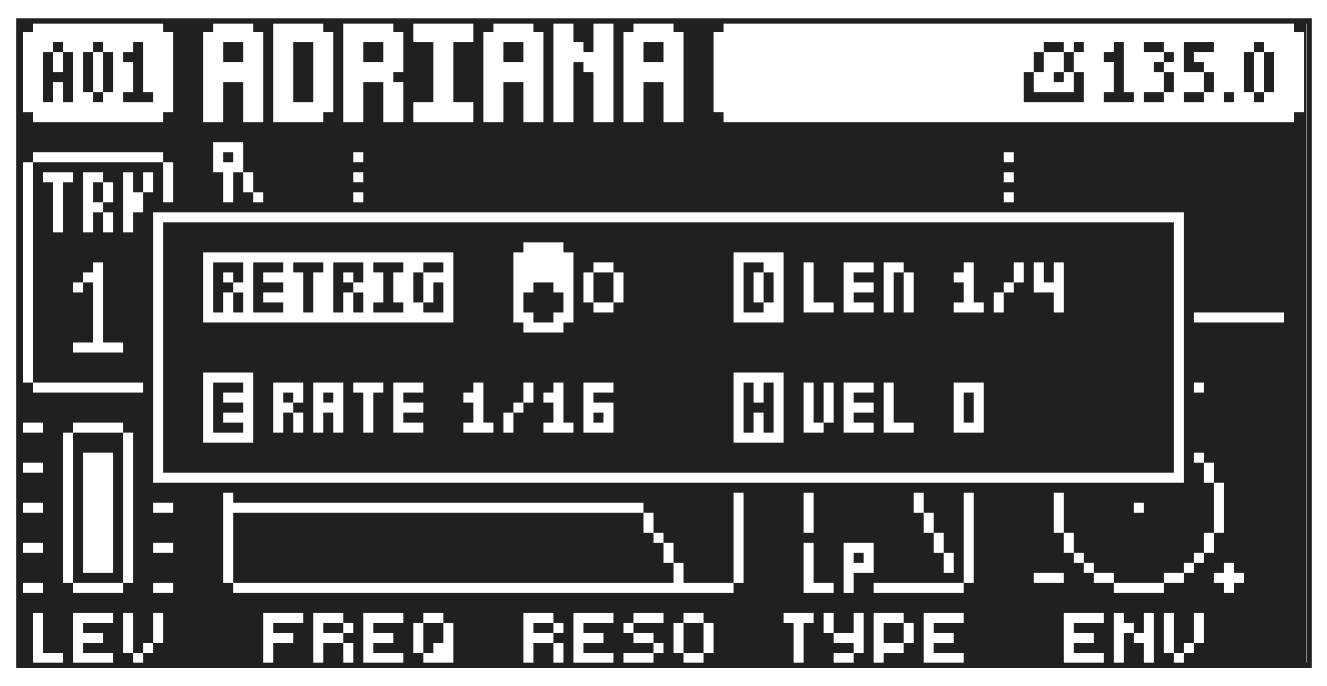
Retrigs can be customized on any of the sequencer steps on the audio tracks (the retrig function is not available on the MIDI tracks). In GRID RECORDING mode, press and hold one or several [TRIG] keys and then press [UP]/[DOWN] to access the pop-up Retrig menu that shows the retrig actions for the chosen sequencer step(s) on the active track. To exit the Retrig menu, release the [TRIG] key(s). The retrig settings are stored in the active pattern.
RETRIG Turns the retrig lock ON/OFF. Use DATA ENTRY knob A to turn retrig on/off.
RATE Sets the retrig rate (1/1, 1/2, 1/3, 1/4, 1/5, 1/6, 1/8, 1/10, 1/12, 1/16, 1/20, 1/24, 1/32, 1/40, 1/48, 1/64 or 1/80). 1/32 is the default retrig rate. 1/32 corresponds to two trigs per step. To trig triplets, for example, set the retrig rate to 1/12 (or 1/24). You can also press the [UP]/[DOWN] keys when you are in the retrig menu to adjust the rate.
LEN Sets the duration of the retrig velocity curve in fractions of, or rational or integer multiples of, a step (0,125–INF). 1/16 is the nominal length of one step. This setting affects the behavior of the velocity curve by defining the boundaries of its envelope.
VEL Sets the velocity curve fade out/fade in of the retrig (-128–127). -128 corresponds to a complete fade out during the set length, -64 fades out to half the velocity during the set length, 0 equals a flat velocity curve with no fade, 64 fades into half velocity during the set length and 127 fades in completely to full velocity during the set length.