10.5 FLTR PAGE 1
10. AUDIO TRACK PARAMETERS > 10.5 FLTR PAGE 1 · PDF 第 51–52 · OS 1.42
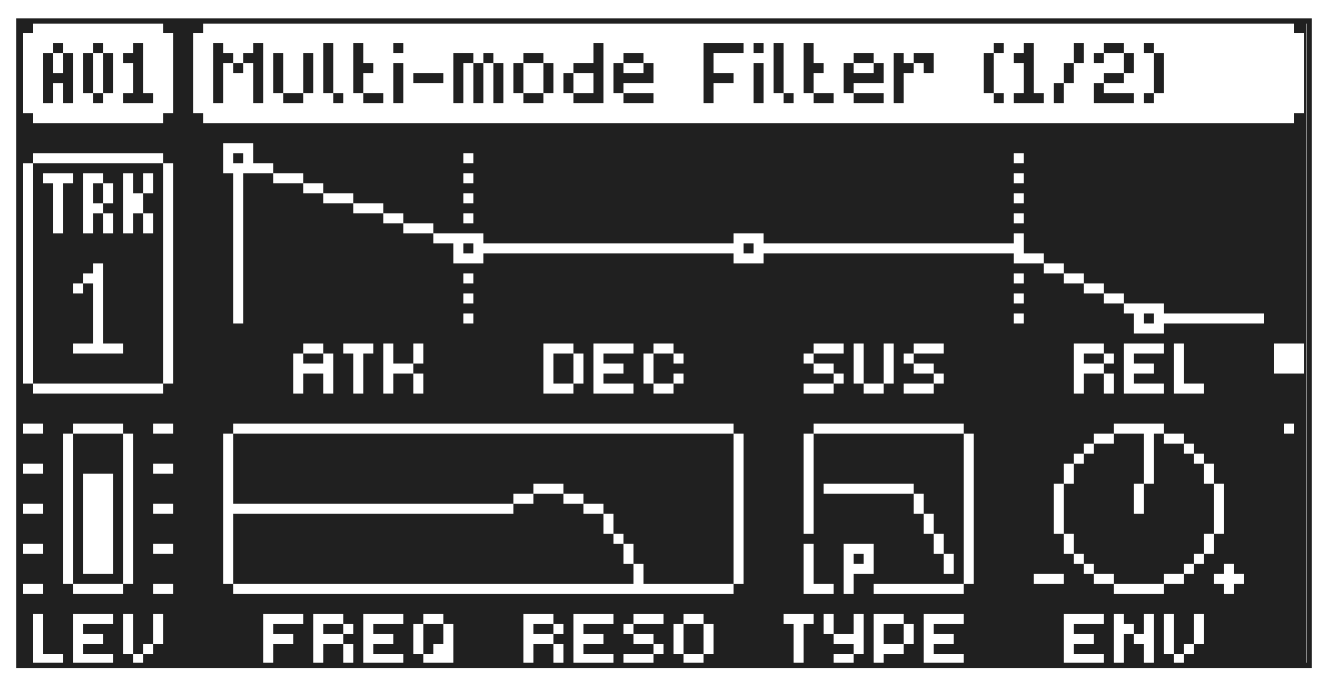
On FILTER page 1, you will find all parameters that control the multimode filter and its associated envelope. Press [FLTR] to access this parameter page.
10.5.1 ATK
Attack Time sets the length of the attack phase of the filter envelope.
10.5.2 DEC
Decay Time sets the length of the decay phase of the filter envelope.
10.5.3 SUS
Sustain Level sets the sustain level of the filter envelope.
10.5.4 REL
Release Time sets the length of the release phase of the filter envelope. The release time can be set to infinite.
10.5.5 FREQ
Frequency sets the cutoff frequency of the multimode filter and the center frequency of the EQ.
10.5.6 RESO/GAIN
Resonance sets the resonance behavior of the filter. Resonance introduces a peak in the spectrum at the cutoff frequency. Gain sets the amount of boost/cut around the center frequency of the EQ. Positive parameter values boost, negative cut.
10.5.7 TYPE
Filter Type selects the type of filter. (Lowpass, Highpass, EQ 1–5, and OFF for tracks with the Digital voice types, track 1–8) and (Lowpass, Bandpass, Highpass, Notch, Lowpass shelf, Peak, Highpass shelf, and OFF for tracks with Analog Drum and Analog Cymbal voice types, track 9–12).
- The filter types on tracks 1–8 are digital, while the filter types on tracks 9–12 are all analog circuits.
- The parametric EQ is used to boost desired frequencies or to remove unwanted frequencies of the sound.
- The five different settings of the EQ lets you select the bandwidth of the frequency range that the EQ affects. This value is often referred to as Q. The higher the Q value, the narrower the bandwidth. A broad bandwidth boosts or cuts a larger band of frequencies than a narrow.
10.5.8 ENV
Env. Depth sets the amount of cutoff frequency modulation from the filter envelope. The parameter is bipolar, both negative and positive modulation depths are available.
TIME
AMPLITUDE
Note On
Attack Decay Sustain Note Off
Release Env.
Delay