14.8 PERSONALIZE
14. SETTINGS MENU > 14.8 PERSONALIZE · PDF 第 80–81 · OS 1.42
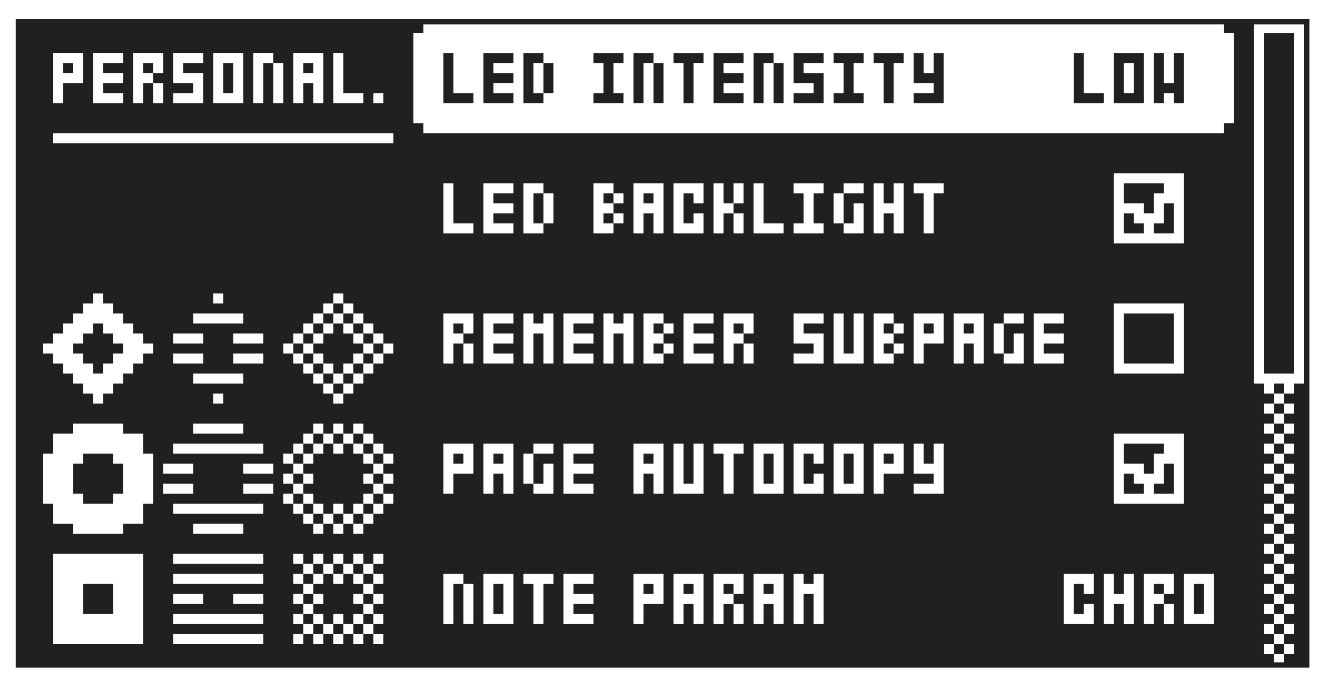
Here you can customize a number of settings to fit you personal preferences.
14.8.1 LED INTENSITY
Sets the brightness of the key LEDs and screen. Use the [LEFT]/[RIGHT] keys to change the setting (LOW, MID, MAX).
Press [SETTINGS] + [TRIG 1–3] to set the intensity of the key LEDs and screen. [SETTINGS] + [TRIG 9] toggles the key LEDs backlight on/off.
14.8.2 LED BACKLIGHT
Switches the key LEDs backlight on/off.
14.8.3 REMEMBER SUBPAGE
Will, when selected, remember which PARAMETER page’s subpage you last used and access this page again the next time you press the same [PARAMETER] key. Use the [YES] key to toggle this setting.
(ON, OFF).
14.8.4 PAGE AUTOCOPY
Will, when set to on, automatically copy already placed trigs when extending the length of a pattern. If a pattern consists of for example two pages and the pattern length is increased to four pages, the two additional pattern pages are then copies of the first two pattern pages. For more information, please see “10.11 PAGE SETUP MENU” on page 48.
14.8.5 NOTE PARAM
Sets the interaction behavior for the NOTE parameter on the TRIG PARAMETERS page.
CHRO: Turning DATA ENTRY knob A changes the parameter in chromatic steps. Pressing and turning DATA ENTRY knob A changes the parameter in steps that follows the set scale.
SCALE: Turning DATA ENTRY knob A changes the parameter in steps that follows the set scale. Pressing and turning DATA ENTRY knob A changes the parameter in chromatic steps. For more information, please see “8.5.2 KEYBOARD SETUP MENU” on page 25 and “11.2 TRIG PAGE 1” on page 57.
14.8.6 LIVE REC OVERDUB
When checked, allow you to add notes and locks in LIVE RECORDING mode to already placed trigs instead of replacing them.
14.8.7 PARAM LIVE REC
This option lets you select whether parameter locks recorded in LIVE RECORDING mode will be added to all sequencer steps or only to steps that already contain a trig. There’s also a shortcut that lets you temporarily invert this setting. In LIVE RECORDING mode, hold [REC] while turning the knobs to reverse the behavior defined by PARAM LIVE REC for as long as [REC] is held. Once you release [REC], the behavior switches back to whatever is set by PARAM LIVE REC.
14.8.8 TRK SELECT
This option lets you decide what happens when you press a trig key (when not in a recording mode) to change tracks.
NORMAL Tracks are selected when pressing a [TRIG] key and plays a sound.
SILENT Tracks are selected when pressing a [TRIG] key but does not play a sound.
MANUAL Tracks are not selected when pressing a [TRIG] key but plays a sound.
INVERTED Tracks are selected when pressing a [TRIG] key but does not play a sound. However [TRK] + [TRIG] plays the track’s sound and selects the track.
In NORMAL, SILENT, and MANUAL, [TRK] + [TRIG] selects the track without playing a sound.
14.8.9 FX TRK SELECT
This option sets how track selection behaves when you’re on the FX track and want to switch to another track (when not in a recording mode).
NORMAL Tracks are selected when pressing a [TRIG] key and plays a sound. [TRK] + [TRIG 1–12] selects another track without playing a sound.
MANUAL Tracks are not selected when pressing a [TRIG] key but plays a sound. [TRK] + [TRIG 1–12] selects another track without playing a sound.