13.1 SAMPLING MENU
13. SAMPLING > 13.1 SAMPLING MENU · PDF 第 68–69 · OS 1.17
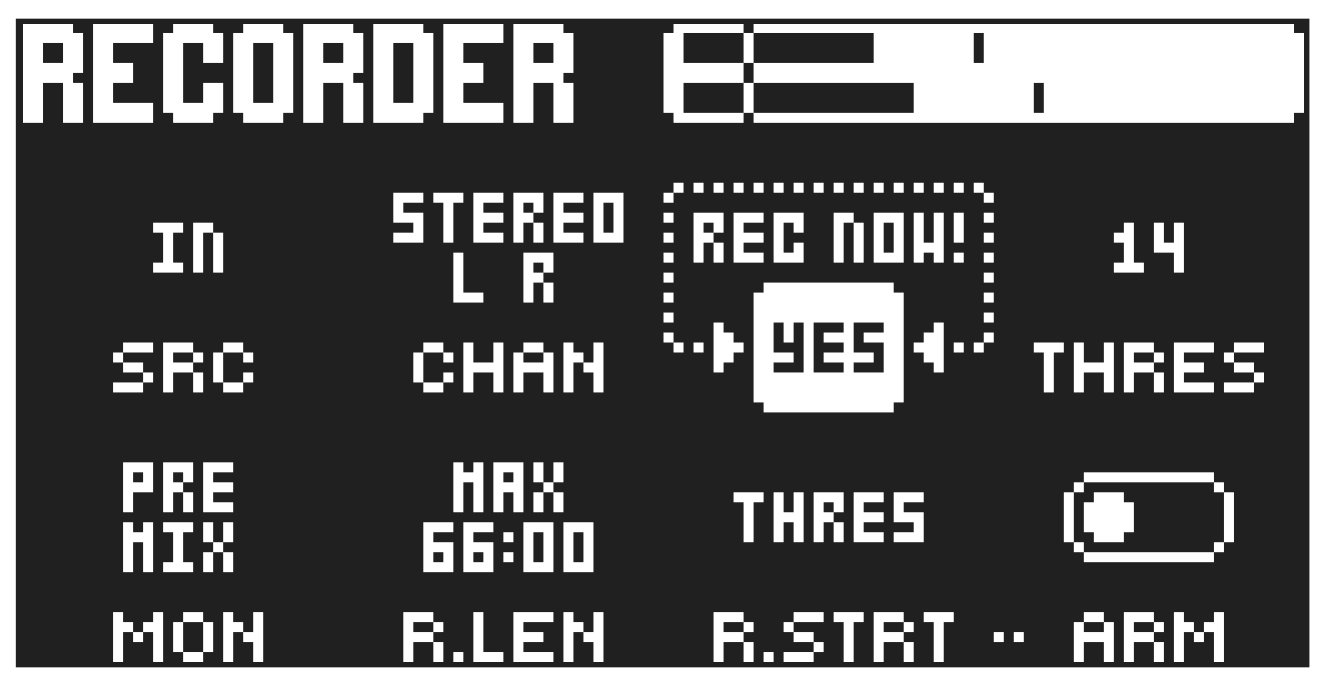
The SAMPLING menu offers settings that control the different aspects of sampling.
Press [SAMPLING] to access this menu. Use the DATA ENTRY knobs to change the parameters.
13.1.1 SRC
Source selects between different audio sources to sample from.
- MAIN sets the input source to the Digitakt II internal main audio channel(s).
- USB sets the input source to USB and lets you sample audio using Overbridge or from a connected class compliant audio host.
- TRK1–16 sets the input source to one of the Digitakt II’s internal tracks.
- IN sets the input source to INPUT L and/or R which lets you sample from external sources.
13.1.2 CHAN
Sets which channels the recorder should sample from.
- STEREO L R sets the recorder to sample both left and right channels from the source.
- MONO L sets the recorder to only sample the left channel from the source.
- MONO R sets the recorder to only sample the rightchannel from the source.
- MONO L+R sets the recorder to sample both left and right channels from the source, but the audio is then summed to mono.
13.1.3 RECORD NOW
Press [YES] to start sampling. Press [YES] to stop sampling. This quick way of sampling does not consider the THRES and ARM parameter settings.
13.1.4 THRES
If you have selected to arm the sampler, the sampling begins when the incoming audio signal exceeds the threshold set by this parameter provided that R.STRT is set to THRES. Set the threshold high enough so that it is not triggered by background noise, but low enough that you capture all of the signal.
13.1.5 MON
Selects the option to monitor the incoming audio through the Digitakt II’s mixer and effect settings on the EXTERNAL MIXER page (POST MIX) or not (PRE MIX). The MON parameter is only available if SRC is set to IN L R.
- Please note that the recorded audio will always be the dry input signal and without the Digitakt II’s effects added.
- Setting the MON parameter to PRE MIX disables the External In mixer functionality. For more information, please see “12.9 EXTERNAL MIXER” on page 66.
- If MON is set to PRE MIX, make sure that the IN L R setting on the EXTERNAL MIXER page is turned up or else you will not hear any sound.
13.1.6 R.LEN
Record Length sets the length of the sampling. With a setting of 1–128 steps, the sampling length is decided by the time that it takes the sequencer to advance the set number of steps at the current BPM. With the MAX setting, the sampling continues until max sampling time (66 seconds) is reached or until you press [YES] to stop sampling.
13.1.7 R.STRT
Record Start lets you set if the recorder will start sampling when you press [PLAY] or when the level of the audio source exceeds the threshold level set by THRES and with ARM set to ON
13.1.8 ARM
When ARM is set to on, the recorder will start sampling when the incoming audio exceeds the threshold level. See THRES above. You can also press [SAMPLING] + [YES] to arm the recorder. Press [SAMPLING] + [NO] to cancel.